You can’t rely on LLMs to understand the grain of your data
When I generate an analysis notebook figure or table with an LLM I just want to move forward with the result. I don’t want to spend time grading the LLM’s homework. There’s no reward for checking the analysis of an LLM — emotionally or from my colleagues. Analysis graphs and figures are what I get paid to generate, and the expectation with LLMs is that I generate them faster. Even before LLMs became much better around November 2025, I knew that faster, more responsive analysis gets rewarded over slower, more thoughtful analysis. That’s been true of the industry as long as I’ve been in it. The speed at which LLMs can generate results, and the accompanying expectations, have just compounded this.
I’ve noticed that the pre-LLM friction of having to write analysis myself was a form of protection. Having to type everything caused me to subconsciously think about what I was doing, without conscious effort. It was a process running in the background. Now with LLMs that background thinking is gone. I have to do it consciously, and I’m being nudged by the LLM not to. Even before LLMs became good enough, I usually felt that I should spend more time thinking ahead.
Here’s a concrete example using publicly available real e-commerce data (Olist, 100K orders from a Brazilian e-commerce startup). I gave an LLM this data and asked:
Show an example SQL query that would total revenue by product category and payment type
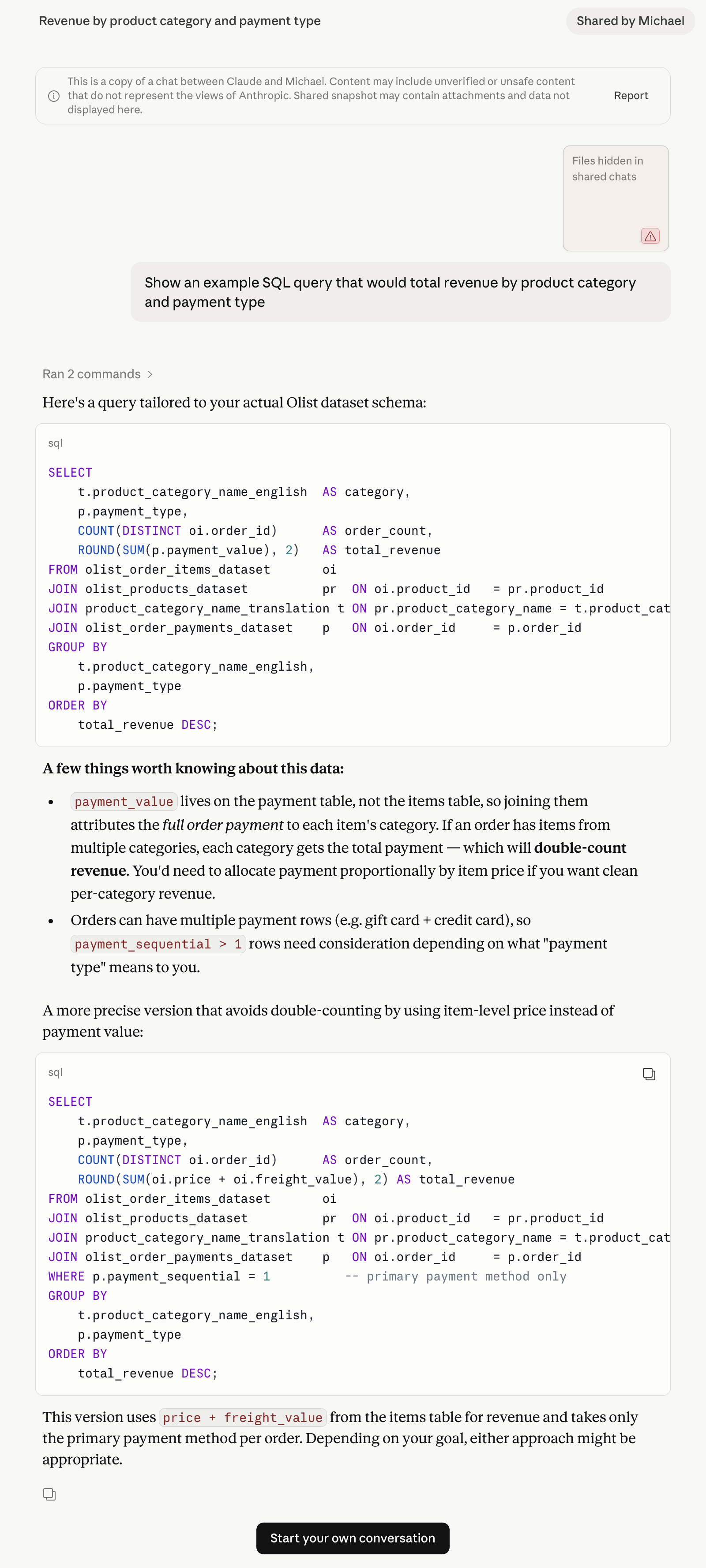
This is the kind of question an analyst might ask. Category comes from the items side of an order (order_items joined to products). Payment type lives in the payments table. Both are keyed to order_id. The natural SQL joins them directly. The LLM identified a potential fan-out issue: where the join would incorrectly create additional rows at the wrong grain. The grain of the data, what each row represents, matters here. The orders table has one row per order. The payments table has one row per payment charge — an order paid with a credit card and two vouchers has three rows. Join that to a multi-item order naively and the payment values multiply, inflating the revenue. The LLM caught this, but its fix introduced a subtler problem. The cognitive danger is that the LLM identified a grain issue, and therefore my unconscious bias is that there are no other issues in the generated analysis. Especially when the LLM sells it in very positive language. However, if I checked this analysis myself I would find a second subtle bug that affects 2.3% of orders. Not impactful perhaps, but incorrect — and presented confidently.
I don’t have any easy answers for this, but I don’t think it can be solved by better prompting.
Unless the analysis ask is very simple, I always start with planning mode. Planning mode adds a little helpful friction back in: reading the plan. While I’m reading, I’m thinking and not doing. Anyone who’s ever reviewed someone else’s code knows that the perspective is different. Using planning mode is a good trigger for this shift. Specifically, when I use planning mode I have a Claude exit hook, which asks the LLM questions like:
- What are the exit criteria, what does success look like?
- What are the invariants and grain of the data?
- What are the potential failure modes?
All of these questions are about fighting bias, mine and the LLM’s. Kahneman might call this System 1 versus System 2. The LLM wants to think fast. I’m trying to think slow. Including these questions almost always shows a gap in the LLM’s thinking — to the extent it makes me worried about code I generated before adopting this habit. These questions often surface assumptions that I didn’t know I, or the LLM, was making.
Going back to the beginning of this article — working with LLMs has become about managing my mental effort as a limited resource. The harder it is to check the work of the LLM, the less likely I am to do it. And the faster the LLM generates, the harder it gets.
Appendix
You don’t need to read this appendix to understand the point I’m making in this article. This section is here if you want to get into the details about how subtle bugs can show up due to data grain misunderstanding. Exactly the type of issue that the current generation of frontier LLMs still seem to struggle with. I didn’t get a chance to try with Fable, but perhaps someone could try using the original prompt above and see how it performs.
| Table | Rows | Unique Orders | Grain |
|---|---|---|---|
| orders | 99441 | 99441 | One row per order |
| order_items | 112650 | 98666 | One row per item in an order |
| payments | 103886 | 99440 | One row per payment charge |
Joining order_items to payments on order_id produces a many-to-many fan-out: every item row × every payment row. The LLM identifies this immediately in the first proposed query.
-- Note: this query is wrong
SELECT
    pr.product_category_name AS category,
    p.payment_type,
    COUNT(DISTINCT oi.order_id) AS order_count,
    ROUND(SUM(p.payment_value), 2) AS total_revenue
FROM order_items oi
JOIN products pr ON oi.product_id = pr.product_id
JOIN payments p ON oi.order_id = p.order_id
GROUP BY pr.product_category_name, p.payment_type
ORDER BY total_revenue DESC;
The LLM flagged the fan-out and proposed switching to price + freight_value from the items table, filtered to the primary payment method:
-- Note: this query is still wrong, but more subtly so
SELECT
    pr.product_category_name AS category,
    p.payment_type,
    COUNT(DISTINCT oi.order_id) AS order_count,
    -- here the LLM has updated total revenue to include freight_value
    ROUND(SUM(oi.price + oi.freight_value), 2) AS total_revenue
FROM order_items oi
JOIN products pr ON oi.product_id = pr.product_id
JOIN payments p ON oi.order_id = p.order_id
-- filter to primary payment method only
WHERE p.payment_sequential = 1
GROUP BY pr.product_category_name, p.payment_type
ORDER BY total_revenue DESC;
This avoids the inflation but misattributes revenue for orders split across payment types. Here’s a concrete example of how this can go wrong:
Order: 0016dfedd97fc2950e388d2971d718c7
Payments
| payment_sequential | payment_type | payment_value |
|---|---|---|
| 1 | credit_card | 52.63 |
| 2 | voucher | 17.92 |
Items
| order_item_id | price | freight_value |
|---|---|---|
| 1 | 49.75 | 20.8 |
The second query, however, attributes all item revenue to payment_sequential = 1, so vouchers which are payment_sequential = 2 disappear from the breakdown:
Orders with split payment types: 2,246 (2.3% of all orders)Voucher revenue (LLM fix): R$ 162,091.39 (1.0% of total)
Voucher revenue (correct): R$ 352,707.71 (2.2% of total)
Misattributed: R$ 190,616.32The fix has a third, quieter problem: some orders have no payment_sequential = 1 row at all, so the WHERE clause drops them entirely:
Orders with no payment_sequential = 1: 80The likely correct approach would allocate each order’s payment across categories proportionally by item price, accounting for vouchers, and potentially other sequential payment types. I haven’t added that query here, but it starts to get more complex. If you’re still reading here, then I think you get the point already about the LLM getting it wrong with a naive prompt.